Import errors

Purpose of the notification
The Import errors notification alerts users about missing data incidents that occur for meters connected to the automatic data import system Sonar.
It is intended for users who have access to the affected meters and informs them about a data gap or measurement interruption.
Procedure
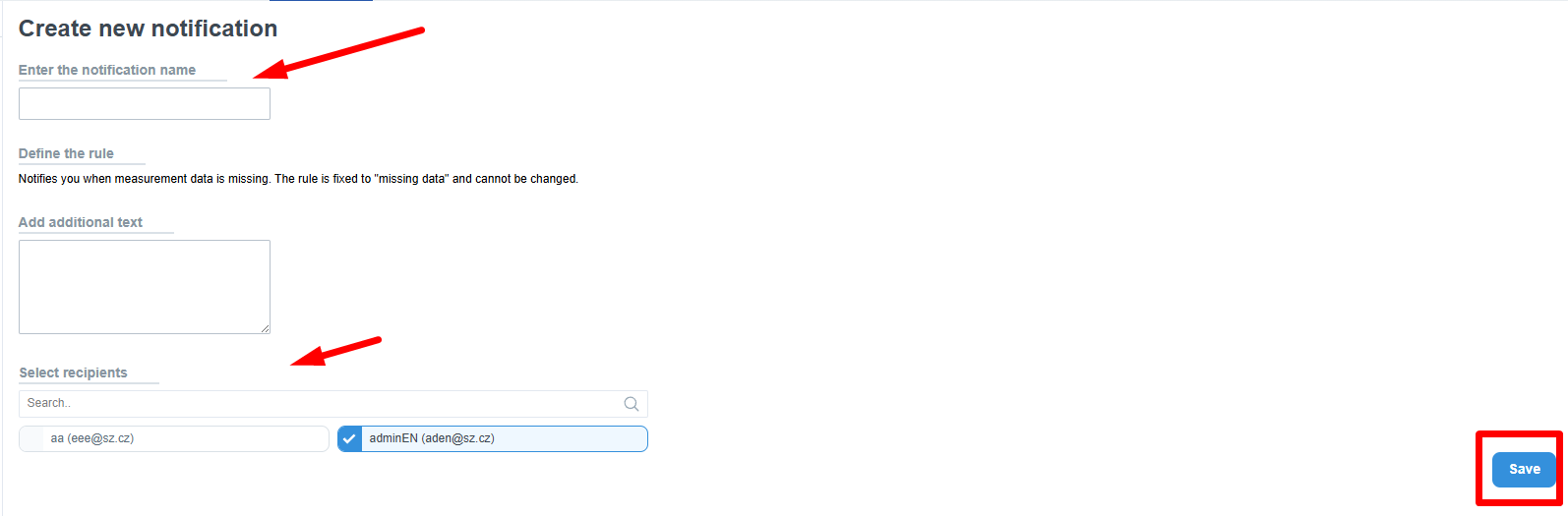
- Click the Import errors button
- In the Enter notification name field, enter a descriptive title that helps identify the notification (e.g., Missing data – Prague)
- In the Set rule section, the incident type missing data is automatically preselected – this rule cannot be changed
- In the Send message field, you may optionally add a note or description (e.g., purpose of the notification or contact information)
- In the Select recipients section, enter names or email addresses of the users who should receive the notification
- The system automatically suggests only users with access to the relevant meters
- Add a recipient by clicking on their name
- When done, click Save
After saving, the notification appears in the list of all notifications, where it can be edited or deleted.
Behavior and logic
- The notification is recorded in the system under the name Import errors
- It is strictly linked to the incident type missing data – no other incident type can be selected or changed
- A missing data incident occurs when a meter stops receiving new data for a defined period
- Once data import resumes, the incident closes automatically
Triggering and delivery
- The notification is not sent in real time; it is evaluated in batches once per day
- The system checks for active incidents at the following times:
00:00, 06:00, 12:00, 18:00 (according to the customer’s time zone) - The notification is sent if the recipient has at least one meter with an active incident
- Each recipient receives a personalized email containing only the meters they have access to
- If the user has no access to any meter with an active incident, the notification will not be sent
- The notification is delivered via email
- SMS delivery is supported but not fully functional at this time
Scope and limitations
- Applies only to meters with automatic import configured in Sonar
- Incidents are generated only for meters, not for data series
- Manually entered meters are not covered by this notification
- If an incident persists, the meter remains listed until the incident is closed
- The notification is available in the notifications list for creation, editing, and deletion
- The name Import errors serves as a category under which other import-related notifications may be created in the future
Access permissions
- Rules for creating, editing, and deleting the notification follow the standard permission policy
- The notification can be created or modified by:
- Support
- Admin
- Property Manager (PM)
- Facility Manager (FM)
- Tenant
- Users with the Technician role have no access to notifications
- Users with the Guest role can only access their own notifications
- When selecting recipients, only users are displayed who:
- have lower permissions
- and access to at least one shared entity
💡 Note: The Import errors notification is designed to automatically inform users about measurement interruptions without requiring manual incident checks in Sonar.